External URL Link as Featured Images

From the Epic Plugins archive. This article is preserved as originally published; historical product details may have changed.
There’s one thing that has been bugging me for a while about WordPress and featured images.
What’s that one thing? It’s how hard it is to set a featured image from an external link.
Mike @ Epic Plugins
It’s 2017 and this still isn’t easy to do. So I wrote a plugin to make this easy for you!
How to have an external link as your Featured Image
- Purchase the amazing link to featured image plugin
- Set featured image from external URL
- Uses a filter to replace the image output.
- The file remains on the external server location.
- Saves you bandwidth.
- Upload image from external URL and set as featured image.
- This uploads the external image to your media library and attaches it to your post as the featured image
- Better for large images as they will be crunched by the WordPress image crunching routine.
- The file will be copied and stored on your own server.
- Automates the process. Saves you time!
Want to start saving time and bandwidth?
Purchase the ‘Link to Featured Image’ plugin today
There’s one thing that has been bugging me for a while about WordPress and featured images.
What’s that one thing? It’s how hard it is to set a featured image from an external link.
The Problem:
WordPress only allows you to set the featured image of a post (or custom post / page etc) as an item that is already in your media library. So if you see a cool image that you’d like to use. You have to save it, upload it, then insert it. A bit of a pain to do.
Why don’t they allow you to do this? Well because the post thumbnails used by WordPress goes through a fair bit of processing and they display them as 150×150 images (rather than massive 10MB images if you were to simply use an external URL of a large image).
The Solution:
I decided to do something about this. I read through all the WordPress codex and through the “core” code of the popular CMS platform and I have developed a nice and easy plugin that lets you set your posts “featured image” by URL.
I thought it would be useful to share. So I’ve put it up on the store for a super low price.
The image below is from the WordPress Admin area. Where you usually click ‘Set Featured Image’ you can now enter a URL to use. It then stores this into the post’s custom field and outputs it instead of the featured image. A huge timesaver.
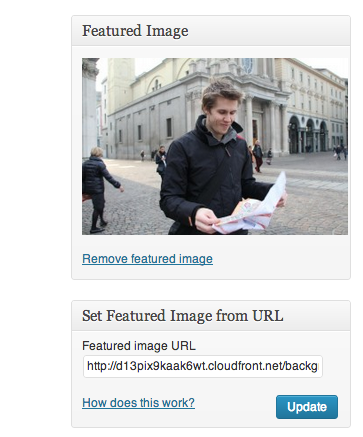
This price tag is so low, that’s it’s almost like saying. Hey Mike that’s cool, let me buy you a cup of coffee and a snack so you can carry on making these EPIC plugins.
What’s a quick cup of coffee in return for something that can save you endless hours of time in your future blogging / website management. I say… priceless!
How does it work?
- A new meta box is added to your post pages (you can move this anywhere you like)
- Enter the link to the external image you’d like as the featured image (make sure you have permission to use the images)
- Click update
- This prompts WordPress to look at the URL
- If it’s an image it will add it to your media library and crunch it
- It will then set the image as your posts featured image
- You’ll then feel all EPIC because you’ve just saved yourself a TON of time
It’s really that easy!
Buy Now for $15